
What is group messaging?
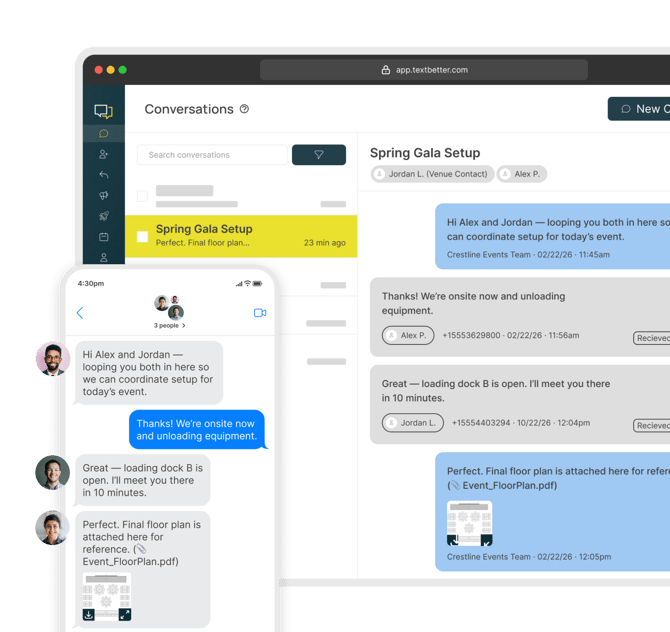
Group messaging allows you to send a single text message to multiple contacts where everyone in the group can see and respond to each other’s messages in one shared conversation thread.
This creates a true group chat experience—similar to texting in a group on your personal phone.
Note: Group messaging is only available to SMS Suite users. It is not supported on the Email to Text platform.
How is group messaging different from blast messaging?
While both involve messaging multiple contacts, they function very differently:
Group Messaging
- One shared conversation thread
- All participants can see every message
- Participants can reply to the group (everyone sees replies)
Blast Messaging (Text Blasts)
- Messages are sent individually to each recipient
- Conversations remain 1:1
- If a recipient replies, it opens a private conversation between you and that individual only
When to use each:
- Use group messaging for collaborative conversations (e.g., team coordination, small group discussions)
- Use blasts for announcements (e.g., marketing, alerts, notifications)
How do I send a group message?
To start a group message in the SMS Suite:
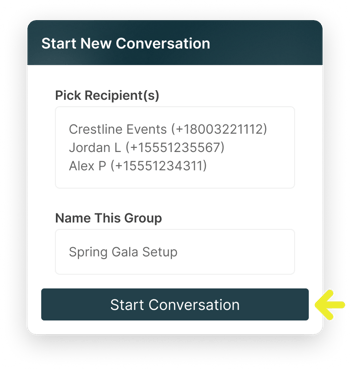
- Click “New Conversation” in the top right of the app

- Select multiple contacts from your address book, Name your group (e.g., “Spring Gala Setup”), and Click Start Conversation.
How much does group messaging cost?
Group messaging is available to SMS Suite users for $2 per text-enabled number, per month. Messages sent via group messaging count toward your plan’s included outbound message segments.
Message Segments & Billing Explained
Group messages are billed the same as standard 1:1 messages—based on Message length (segments) and Number of recipients.
Key Details:
- 1 segment = 153 characters (including spaces)
- Messages longer than 153 characters count as multiple segments
- Each recipient counts separately
Group Messaging Example:
- Send a 1-segment message to 3 recipients
→ Billed as 3 segments (1 segment × 3 recipients)
1:1 Messaging Example:
- Send a 1-segment message to 1 recipient
→ Billed as 1 segment (1 segment × 1 recipient)
Any usage beyond your included monthly amount is billed at $0.04 per outbound message segment until your monthly limit resets.
This follows standard TextBetter billing practices. For more details, please refer to your Terms of Service or contact support@textbetterinc.com.