
What is TextDistro?
TextDistro is a simple text distribution list feature that allows your organization to quickly send the same text notification to a predefined group of contacts directly from your email inbox.
TextDistro is commonly used for:
- Employee notifications
- Shift alerts
- Internal announcements
- Emergency communications
- Department-specific updates
Important: TextDistro is only available with the Email to Text product. It is not supported within the SMS Suite or other TextBetter applications.
How do I send a text message to a distro list?
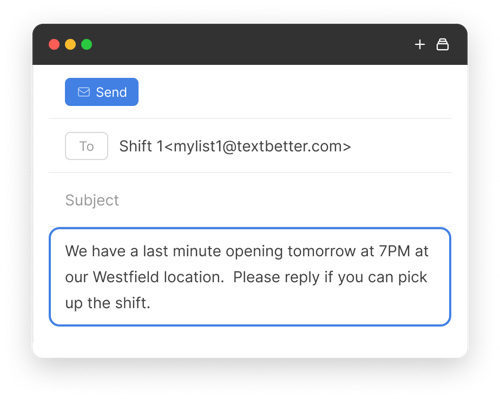
Once your distro lists have been created in the Admin Portal, sending a notification is simple:
- Compose a new email message
- In the To field, enter the appropriate distro list address.
Example:
Mylist1@textbetter.com
- Type your message in the body of the email
- Click Send.
TextBetter will automatically send the text to every contact on your list.
.png?width=500&height=221&name=Frame%201000001261%20(2).png)
💡Does TextDistro personalize messages?
Yes. TextDistro automatically inserts the recipient’s First Name at the beginning of each message sent.
How do I create a distro list?
- Log in to the admin portal
- Navigate to Settings > Distro Lists
- Use the Select Distro List dropdown to choose one of the 9 available lists, then enter a short name for the list (e.g., Accounting, Shift 1, Shift 2, etc.)
- Then click Update.
Once done, you'll be able to add contacts to your list.
Managing contacts lists
How do I add or edit contacts within a distro list?
You can manage your distro lists in two ways:
-
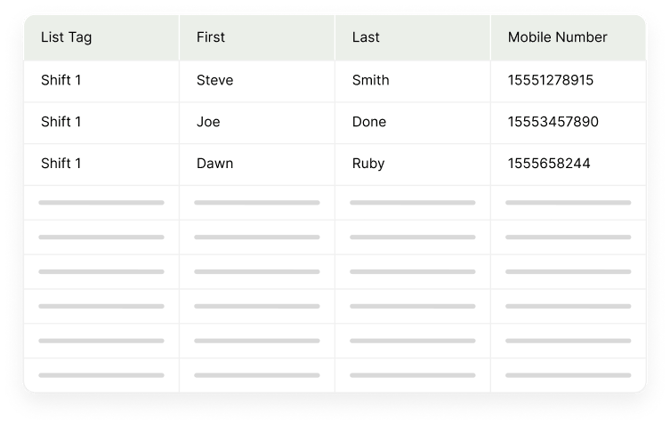
Bulk Upload: Use the bulk upload utility to upload contacts using a.csv or .txt file
- Individual Contact Management: Add, edit, or delete contacts one at a time by clicking the pencil icon next to a contact.
How to delete an entire distro list?
-
Use the Delete Entire List button to remove all contacts from a selected distro list.
How many distro lists can I create?
-
Each company can create up to 9 separate distro lists.
-
Each list can contain up to 99 contacts.
How is TextDistro billing calculated?
TextDistro is usage-based, so you only pay for what you send. Messages are priced per outbound segment, using the volume-based rates outlined below:
- $0.04 per outbound message segment for the first 10,000 segments
- $0.03 per outbound message segment for the next 10,000 segments
- $0.015 per outbound message segment thereafter
For Example: a 2-segment message to a distro list of 99 recipients, would cost $7.92
The billing calculation would be:
- 2 message segments × 99 recipients = 198 outbound message segments total
- 198 × $0.04 = $7.92
Mass Texting & API Tools, including TextDistro, are billed separately and do not count toward your plan’s included usage or standard overage calculations. ➝ Message Usage & Billing FAQ for more information.